
The Most Extensive Integration between WooCommerce and Stripe Checkout
Replace WooCommerce checkout with Stripe Checkout.SA Hosted Checkout for WooCommerce, a plugin developed to improve your online store’s revenues by giving more confidence to the customers to checkout. It effortlessly connects your WooCommerce store with Stripe Checkout bypassing the WooCommerce checkout completely.
 Download Free

 Buy Premium
 Compare Features
 Our plugins are trusted by thousands of websites throughout the world.


SA Hosted Checkout for WooCommerce
SA Hosted Checkout for WooCommerce is a WordPress plugin specifically created to integrate WooCommerce with Stripe Checkout. The plugin makes it possible to replace WooCommerce Checkout with Stripe Checkout in a few clicks. Stripe Checkout is a complete checkout system hosted securely on Stripe and comes with state of the art checkout features.
 WooCommerce

 Stripe Checkout
Stripe Checkout comes with:
 1-click payment using Link
- Real-time card validation
- Address auto-complete
- Conversion Optimized
- Payment method reuse
- Third-party autofill
- Built for Global Customers
- Ready for all devices
 1-click payment using Link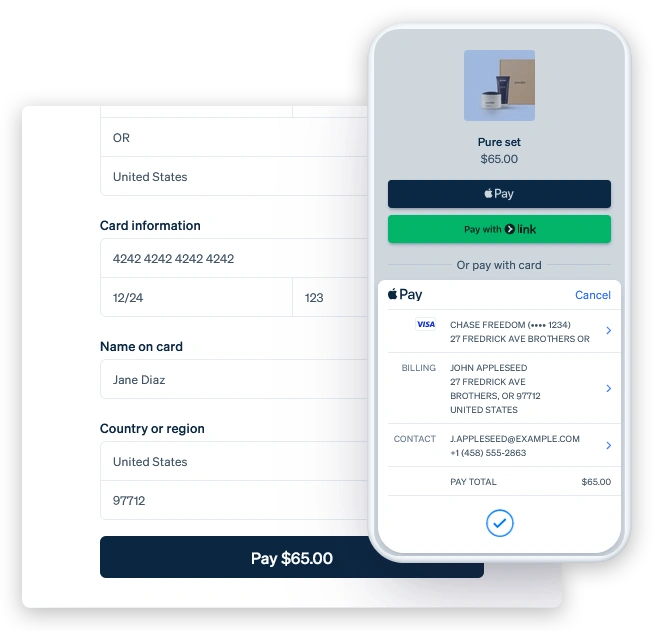
What ‘SA Hosted Checkout for WooCommerce’ has to offer


Replace WooCommerce Checkout with Stripe Checkout
After activating the plugin, you will initially be redirected to the default WooCommerce checkout page when completing a purchase on your site. Once the plugin is successfully enabled, you will bypass the default WooCommerce checkout page entirely and be taken directly to the Stripe checkout page.


High Performance Order Storage Support
The plugin comes with built-in support for the WooCommerce High Performance Order Storage (HPOS) update.

Support for WooCommerce Coupon Codes and Discounts
The premium version of the SA Hosted Checkout for WooCommerce plugin natively supports WooCommerce coupon codes and discounts, meaning any discounts or coupons applied to the cart, products, or shipping will automatically be reflected in the Stripe Checkout.


Support for Custom Payment Methods
This plugin allows you to choose from default or custom payment methods, depending on your needs. By default, the plugin is set to use Stripe as the payment method. To switch to custom payment options, click on the “Custom” tab to view the available payment methods integrated with the plugin.


Add Custom Fields to Stripe Checkout
Stripe Custom Fields offer a set of customizable fields that you can add to your Stripe checkout page, enhancing the user experience with more detailed and engaging options.


Choose Stripe Checkout Language
By default, WooCommerce uses English for the checkout page, and this language will be pre-selected in the plugin’s settings. If you wish to use a different language, simply click the “Custom” tab, where you can select your preferred language from a dropdown for the Stripe checkout page.


Stripe Checkout Sessions Information
Stripe Sessions provide a detailed view of all checkout sessions created through Stripe, including both paid and unpaid sessions. You can access customer and order details for greater insight into each transaction.


Custom Shipping Text on Stripe Checkout
The premium version of the SA Hosted Checkout for WooCommerce plugin enables the admin to add custom text that will appear after the shipping address fields on the Stripe checkout page, making it easy to display shipping-related messages or notes to customers.


Enable or Disable Phone Number Field
This option allows you to enable a phone number field on the Stripe checkout page, where customers can enter their contact information to complete their order.


Custom Thank You page
WooCommerce provides a default thank you page after an order is placed. To use this page, simply select the “Default” tab. If you want to display a custom thank you page for your customers, click on the “Custom” tab.


Enable or Disable Terms and Services Checkbox
This option lets you add a Terms and Conditions checkbox to the Stripe checkout page, requiring customers to agree to your terms before proceeding with their purchase.
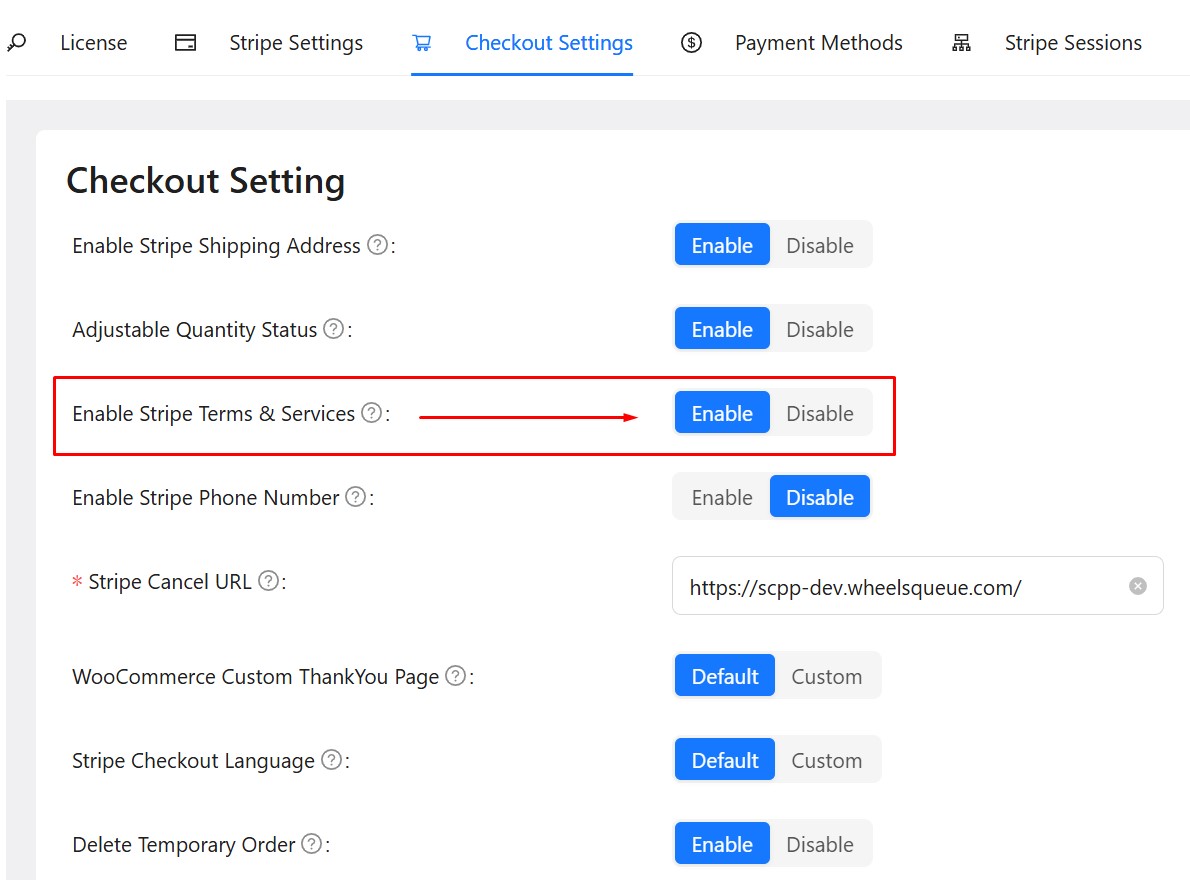

Custom Terms and Services Text
The premium version of the SA Hosted Checkout for WooCommerce plugin allows the admin to add custom text for the Terms and Conditions section on the Stripe checkout page, making it easy to display your policies directly to customers.


Set a Cancellation URL
This option provides a field where you can specify a URL for a landing page. This page will be shown if a customer navigates away from or cancels the Stripe checkout process.


Custom Text Before and After Submit Button
The premium version of the SA Hosted Checkout for WooCommerce plugin enables the admin to add custom text before and after the Submit button on the Stripe checkout page. This feature is useful for displaying important messages related to payments, order processing, or shipping.


Adjustable Quantity on Stripe Checkout
This option allows customers to adjust the quantity of products directly on the Stripe checkout page, without returning to the cart. When enabled, a ‘Qty’ dropdown will appear under each product, allowing customers to select the desired quantity, which can be updated by clicking “Update” in the popup.


Admins Test Mode
Admin Test Mode enables only website administrators to activate a test mode, allowing them to process test orders on the site using test Stripe payments.


Premium Support by Sleek Algo Technical Team
Buying the premium version provides you with access to our premium email support. All the emails and tickets are addressed on priority by qualified and seasoned professionals. The team can help you set up the plugin or even advise on alternatives if the plugin does not support the functionality you are looking for.
14 Days Money Back Guarantee
Sleek Algo provides 14 days money back guarantee on all their premium products. If any of the functionality promised by the plugin does not work well on your particular web store and our technical support team is unable to fix the issue for you, we will be happy to give you a complete refund with no questions asked.
Pricing
Buy the fully loaded Premium Version
Secure checkout by Freemius Inc (US)

14 Days Money Back Guarantee

99% Customer Satisfaction Rating

Secure Checkout by Freemius

PCI Compliant Checkout

FAQs
How does it bypass WooCommerce default checkout?

I have installed the plugin but my plugin appears disabled?
I want to add custom payment methods to my Stripe Checkout?
I want to customize my Stripe Checkout page?
How can I check Stripe Checkout sessions which were created on my website but never completed?
Guide Video
Documents
Login to WordPress Admin section and go to the plugins section.


After activating the plugin, you’ll see a new plugin titled “SA Hosted Checkout” added on the installed plugin dashboard. This indicates the plugin is successfully installed on your website.


