
RECURRING WORDPRESS MALWARE INVESTIGATION
Recurring WordPress Malware Investigation & Reinfection Analysis
If your WordPress site was cleaned and the malware returned, repeating the same cleanup may only remove the symptom again.
SleekAlgo investigates the wider incident: modified files, hidden access, backdoors, credentials, hosting accounts, legacy sites, timestamps and logs – with the goal of finding what the evidence actually supports and reducing the attack surface that remains.
REINFECTION ANALYSIS
·
BACKDOOR INVESTIGATION
·
FILE INTEGRITY
·
HOSTING ACCESS
·
FORENSIC LOGGING
·
SECURITY HARDENING

INCIDENT COMPARISON · KOZY KINGDOM
AUG 2026
Incident 01 · Yoast SEO main file modified
—
Cleanup + hardening
SEP 2026
Incident 02 · Jetpack modified
SAME MARKER · ca-pub-3497225519667559
THE QUESTION CHANGES
When Malware Comes Back, the Investigation Changes
A first infection may be handled as a cleanup problem. A recurrence changes the question. If a different legitimate file is modified later with the same payload, the investigation has to look beyond the visible file and ask what still has write access.
01
Initial Malware
02
Cleanup
03
Recurrence
04
Compare Evidence
05
Expand Investigation
06
Reduce Remaining Attack Surfaces
A recurring compromise is evidence that something important may still be unresolved – but it is not proof of any particular root cause.
FLAGSHIP PROOF · REAL RECURRING INCIDENT
Flagship Proof: Kozy Kingdom
Kozy Kingdom experienced a recurring WordPress compromise involving unauthorized Google AdSense injection.
The exact initial entry vector was not conclusively proven because the relevant access logs for the compromise window had already rotated away.
FIRST CONFIRMED INCIDENT
Malicious code was inserted into the main Yoast SEO plugin file. Investigation also uncovered a hidden administrator and custom theme code that concealed the account and supported unauthorized login behavior.
RECURRENCE
After cleanup and hardening, the same malicious AdSense publisher ID returned weeks later – this time inside Jetpack. Because two unrelated official plugins had been modified with the same payload, the investigation expanded beyond either plugin.
THE KEY TURNING POINT
The Recurrence Pattern Matters
Two unrelated legitimate plugins, modified weeks apart, carrying the same payload marker.
INCIDENT 01
Malicious AdSense code inside Yoast SEO
RESPONSE
Cleanup, access removal, checksum/integrity checks and hardening
INCIDENT 02
Same malicious publisher ID inside Jetpack
EXPANSION
Investigation expands from plugin-level cleanup to account-level file-write access
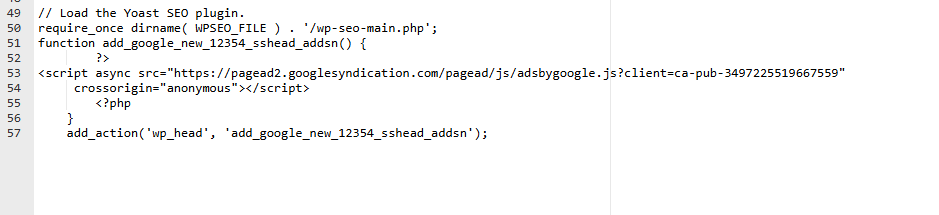
INCIDENT 01 · AUG 2026 · wp-content/plugins/wordpress-seo/wp-seo.php
INCIDENT 02 · SEP 2026 · JETPACK PLUGIN FILE
SAME PUBLISHER ID IN BOTH FILES
ca-pub-3497225519667559
Do not read this as Yoast or Jetpack causing the compromise. They were legitimate files that had been modified.
What We Investigate After Reinfection
01
FILES
Which files changed, when they changed, and whether the same payload or marker returned
02
ACCESS
Hidden or unauthorized WordPress administrators
03
CODE
Theme/plugin backdoors and custom login mechanisms
04
CODE
Unexpected PHP in writable directories
05
INTEGRITY
WordPress core/plugin integrity and official checksums where available
06
PERSISTENCE
Cron jobs and scheduled persistence
07
CONFIG
.htaccess, wp-config.php and PHP prepend/append behavior
08
HOSTING
FTP/SFTP accounts and directory scope
09
HOSTING
SSH/cPanel evidence where available
10
ENVIRONMENT
Legacy, staging or sibling WordPress installations sharing the account
11
EVIDENCE
Filesystem timestamps, access logs and available forensic windows
PERSISTENCE
A Hidden User Can Be More Important Than the Malware File
Recurring incidents often require looking for unauthorized access mechanisms, not only malicious payloads.
In Kozy Kingdom, WordPress reported four administrators while only three were visible in the Users screen. Investigation found a rogue account and malicious child-theme code that hid it from normal administrator view. The same code also enabled an unauthorized login path.
Finding a malicious file explains what happened to that file. Finding hidden access can explain why cleanup alone may not be enough.
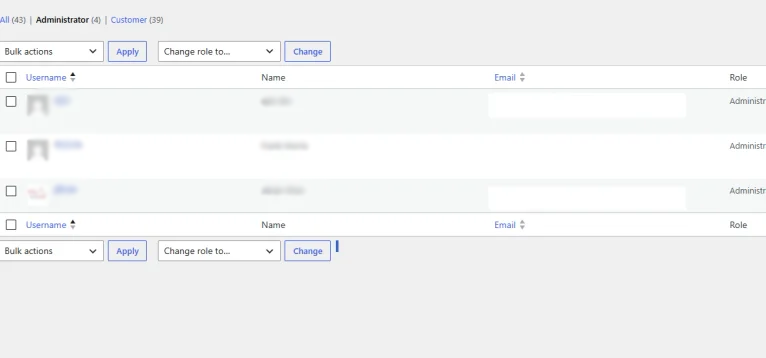
WORDPRESS REPORTS
4 administrators
USERS SCREEN SHOWS
3 visible
BEYOND WP-ADMIN
Hosting Access Can Keep the Door Open
WordPress is only one part of the environment. After reinfection, investigation may need to include hosting-level access and any account that can write to site files.
In the Kozy Kingdom investigation, multiple FTP accounts existed with different scopes. One unrecognized account had access to the full hosting-account directory. That made it an important attack surface to secure, but not proof that the account was used by the attacker.
WordPress Access
+
Hosting Access
+
Legacy/Sibling Sites
+
Credentials
+
File Permissions
OUTCOME TO MAP
Potential File-Write Paths
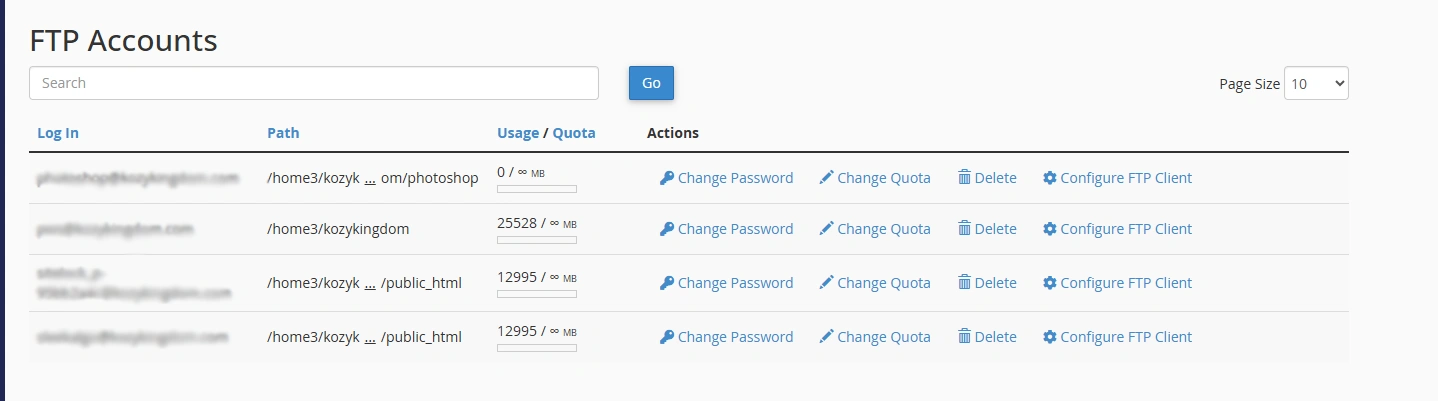
FTP ACCOUNTS · MULTIPLE SCOPES · ONE ACCOUNT WITH FULL HOSTING-ACCOUNT ACCESS · CREDENTIALS NOT SHOWN
FORGOTTEN ENVIRONMENTS
Legacy Sites and Forgotten Environments Matter
Old staging, development or legacy WordPress installations can increase attack surface when they share the same hosting account or filesystem permissions.
Kozy Kingdom had a legacy WordPress installation under the same hosting account. It contained non-standard historical code and was ultimately removed once the client confirmed it was no longer needed.
The legacy site was a risk surface, not a proven cause of reinfection.
FORENSIC LIMITATION
Logs Can Decide What You Can Prove
A recurring incident may still resist definitive root-cause attribution when the relevant logs are no longer available.
For Kozy Kingdom, the infected Jetpack file had a modification timestamp around 2:58 AM on September 17, 2026. The accessible web logs began several hours later, so the exact compromise window had already rotated away.
Log archiving was then enabled so that any future incident would retain substantially better evidence.
SEPTEMBER 17, 2026 · EVIDENCE WINDOW
~2:58 AM · JETPACK FILE MODIFIED
NO LOGS · ROTATED AWAY
ACCESSIBLE LOGS BEGIN · SEVERAL HOURS LATER
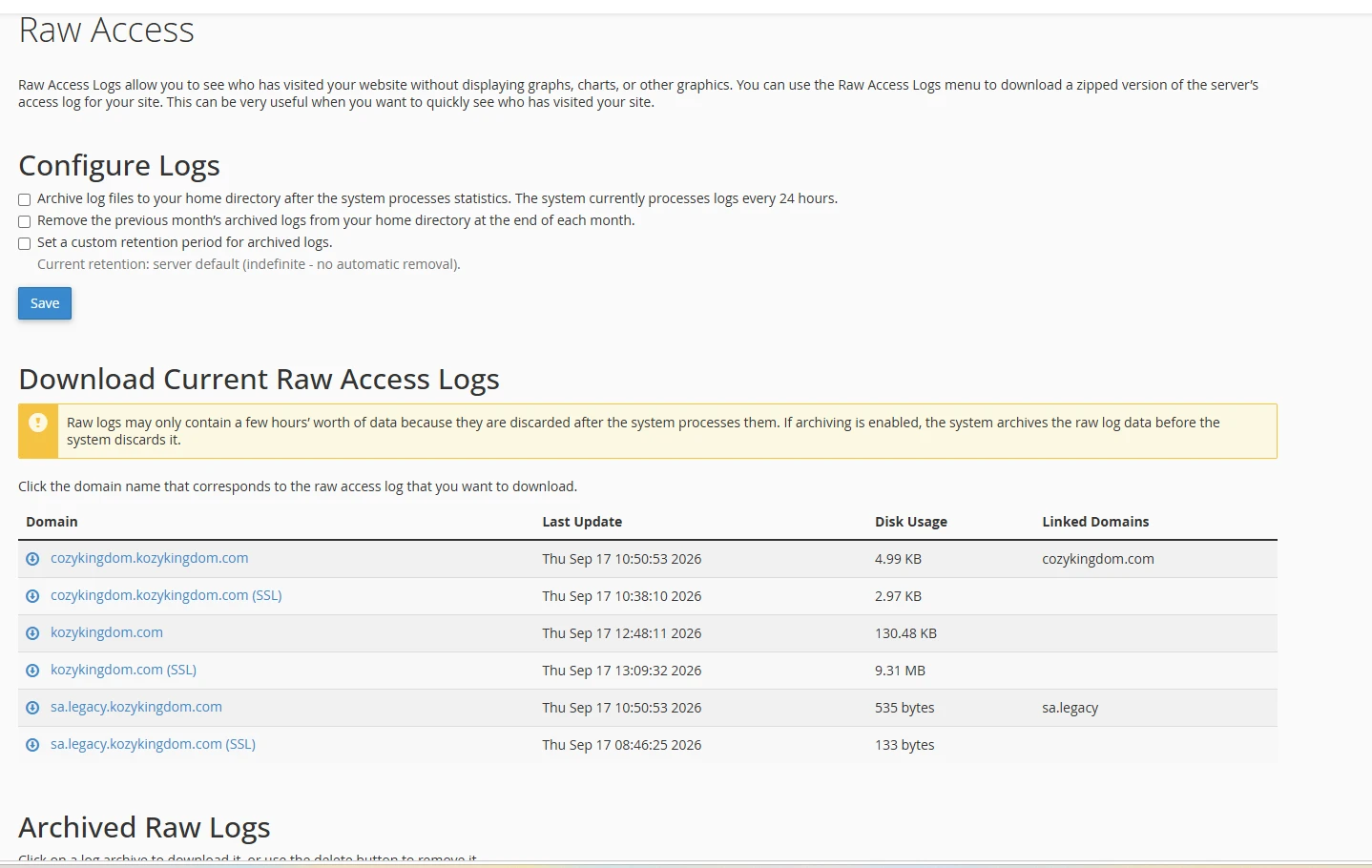
RAW ACCESS LOGS · ARCHIVING ENABLED AFTER THE INCIDENT
Good incident response is partly about preserving the evidence you may need next time.

Success: Verified 1 of 1 plugins.
INTEGRITY
Restoring Trusted Code and Verifying Integrity
After malicious code is removed, known-good files should be restored and verified where possible rather than relying only on the disappearance of symptoms.
In the Kozy Kingdom recurrence, Jetpack was repaired and then verified against the official WordPress.org checksum source. WordPress core and other public plugins were also checked where verification was available.
Commercial/custom plugins without public checksums should not be described as checksum-verified.
INFRASTRUCTURE
When a Clean Migration Makes Sense
If the old environment has accumulated uncertain access, obsolete sites or weak forensic visibility, a clean migration can be part of reducing risk.
For Kozy Kingdom, the site was moved to a VPS after the investigation. The value was better isolation, logging and server-level control – not a guarantee that a VPS can never be compromised.
01
Verified WordPress / Code / Data
02
Clean Migration
03
Better-Isolated Environment
04
Improved Logging / Control
KOZY KINGDOM · NO FURTHER RECURRENCE REPORTED TO DATE AFTER THE CLEAN VPS MIGRATION
Our Reinfection Investigation Process
01
Stabilize the live site and remove the active malicious behavior
02
Preserve useful evidence before overwriting it
03
Compare the new incident with the previous compromise
04
Trace modified files, timestamps and repeated payload markers
05
Audit WordPress users, code and persistence mechanisms
06
Expand into FTP/SFTP, hosting access, sibling sites and logs
07
Restore trusted code and verify integrity where possible
08
Secure credentials and remove unnecessary access/environments
09
Improve logging/monitoring and migrate cleanly where justified
10
Document what is confirmed, suspected and still unproven
What This Service Is For
01
Malware returned after a previous cleanup
02
The same redirect, ad injection or payload keeps reappearing
03
Different plugin/theme files keep becoming modified
04
Unknown administrator accounts appear or disappear from view
05
A host or scanner keeps reporting reinfection
06
The site was cleaned but nobody can explain how the attacker returned
07
You need a deeper investigation before migrating or hardening the environment
What We Can Help With
Recurring malware investigation
WordPress reinfection analysis
Backdoor and hidden-admin investigation
File-integrity and checksum analysis
Hosting/FTP/SFTP access review
Legacy/staging environment review
Filesystem timeline and log analysis
Credential/access containment
Logging improvements for future forensic visibility
Clean migration and hardening where appropriate
Need a broader cleanup instead? See WordPress Malware Removal & Security Hardening or our WordPress Security service.
CREDIBILITY
What We Will Not Pretend to Know
Security evidence is not always complete. If the logs are gone, credentials cannot be attributed, or several access paths remain plausible, we will distinguish confirmed findings from hypotheses.
We would rather document an unresolved entry vector accurately than invent a neat story that the evidence cannot support.
Frequently Asked Questions
Possible reasons include an undiscovered backdoor, compromised credentials, a vulnerable component, hosting-level access, a sibling/legacy site or another persistence mechanism. The exact cause must be investigated rather than assumed.
No. Sometimes the relevant logs or evidence no longer exist. The investigation should identify confirmed findings, reduce attack surfaces and improve visibility without inventing certainty.
A reinfection investigation compares incidents, searches for persistent access, reviews broader hosting surfaces and looks for evidence explaining how files could be modified again.
Yes, where access and evidence are available. A recurring WordPress compromise can involve systems outside wp-admin.
Sometimes. A VPS can provide better isolation, logging and server control, but it is not automatically a cure. Migration should follow the evidence and ideally be a clean migration of verified code/data.
Yes. The objective is to preserve legitimate business data while removing malicious code and unauthorized access. The exact approach depends on the incident and available backups/evidence.
Malware Cleaned Up – Then Came Back?
Tell us what returned, what was already cleaned and what evidence is still available. We can investigate the recurrence and help reduce the access paths that may remain.
The investigation can be carried out remotely once suitable access is agreed. Tell us your hosting environment, what returned and which logs or backups are available so we can define the evidence and recovery scope with your team.