
MULTI-VENDOR MARKETPLACE DEVELOPMENT
High-Performance Multi-Vendor Marketplaces Built Beyond Plugin Limits
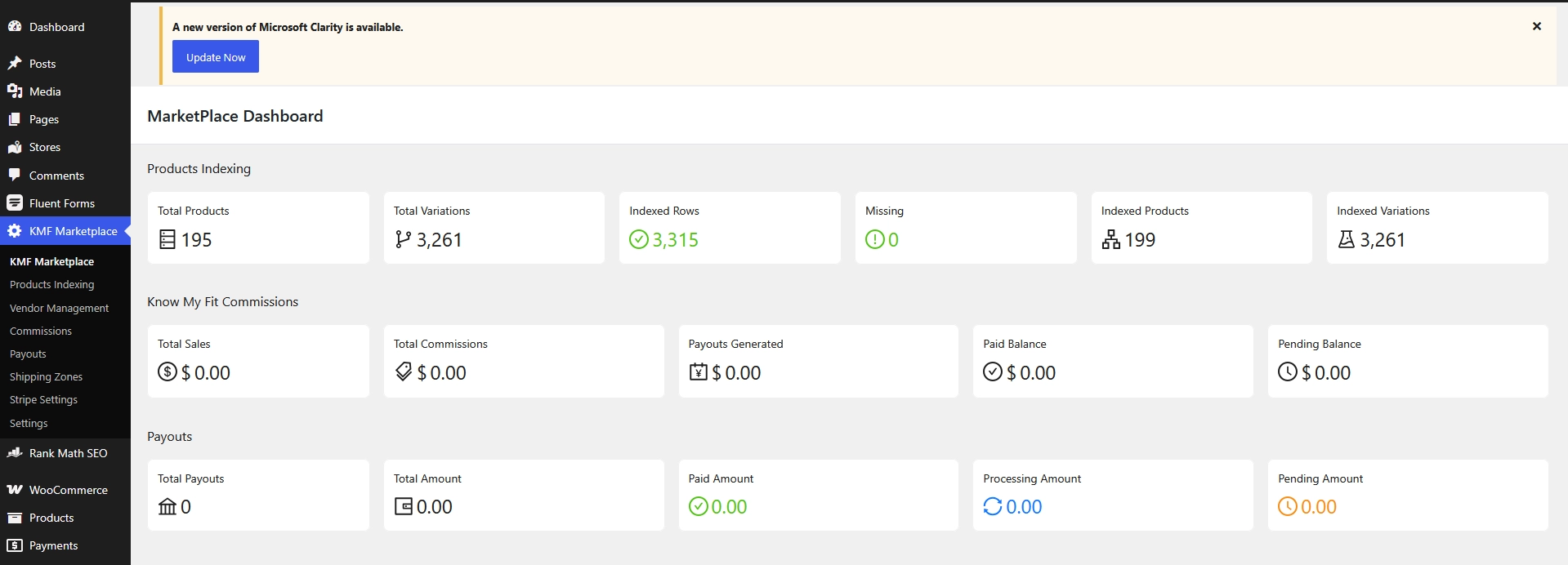
A marketplace can start with standard plugins and still reach a point where filtering, vendor workflows, payments, shipping and administration become too slow or too fragmented. SleekAlgo builds custom WooCommerce marketplace systems around the business rules — keeping WooCommerce as the commerce foundation while replacing the marketplace bottlenecks with purpose-built engineering.
Fast Product Discovery
Custom Vendor Management
Commissions & Payouts
Marketplace Checkout
Scalable Architecture

When a Marketplace Outgrows the Plugin Stack
Multi-vendor plugins are useful when the marketplace fits their model. Problems begin when the business has requirements that cut across several plugins or when the marketplace needs performance and workflows a generic stack was never designed to deliver cleanly.
Common pressure points can include:
Slow or unreliable product filtering as products and variations grow
Vendor onboarding, verification and account rules spread across multiple interfaces
Commission logic that differs by vendor, store or business model
Payout requirements that cannot assume every vendor uses the same provider
Regional or vendor-aware shipping rules
Marketplace-specific search, discovery or location features
Plugin conflicts, duplicate data and difficult maintenance
A frontend experience that needs to move faster than the underlying plugin stack
The answer is not automatically “more custom code.” The first step is identifying which parts of the marketplace should remain native WooCommerce and which parts are genuinely limiting the business.
Keep WooCommerce. Take Control of the Marketplace Layer.
WooCommerce already provides a mature foundation for products, carts, checkout, orders and payment integrations. A custom marketplace architecture can preserve that foundation while moving vendor-specific logic into a system designed around the actual business.
WooCommerce Core
→
Custom Marketplace Layer
→
Customer Experience + Vendor Operations
Custom marketplace layers may include:
Product Discovery & Indexing
Vendor Registration & Approval
Vendor Accounts & Store Management
Commission Rules
Payout Records & Workflows
Shipping-Zone Logic
Marketplace Administration
Location / Vendor Discovery
Fast Product Discovery Often Starts With the Data Architecture
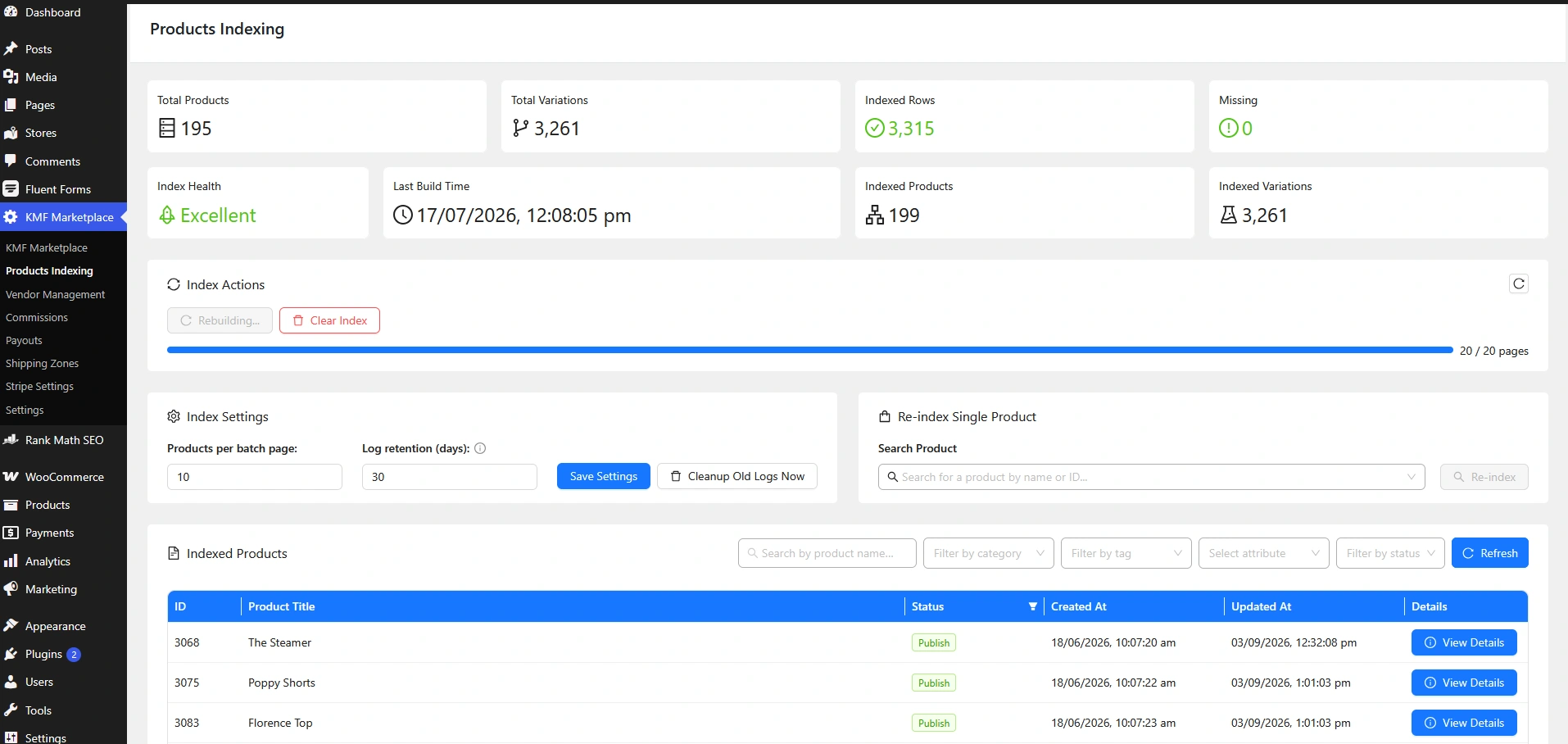
A marketplace can have a beautifully designed filter and still feel slow if each interaction requires expensive runtime queries across products, variations and metadata. In KnowMyFit, SleekAlgo built a dedicated product-indexing system so the filtering experience was not dependent on repeatedly reconstructing complex WooCommerce product data at runtime.
Product / Variation Data
→
Custom Index
→
Marketplace Filters
195
total products
3,261
total variations
3,315
indexed rows
0
missing — “Excellent”
Point-in-time KnowMyFit admin proof, captured in the project’s current state — not a permanent catalogue total or a claimed speed-improvement percentage.
Vendor Workflows Should Match the Marketplace Business Model
A vendor marketplace is not simply a customer-facing shop with extra user accounts. The operational layer has to support the way vendors actually join, sell, get verified, pay commissions and receive payouts — removing unnecessary plugin choreography and giving the marketplace team one coherent operational system.

VENDOR REGISTRATION
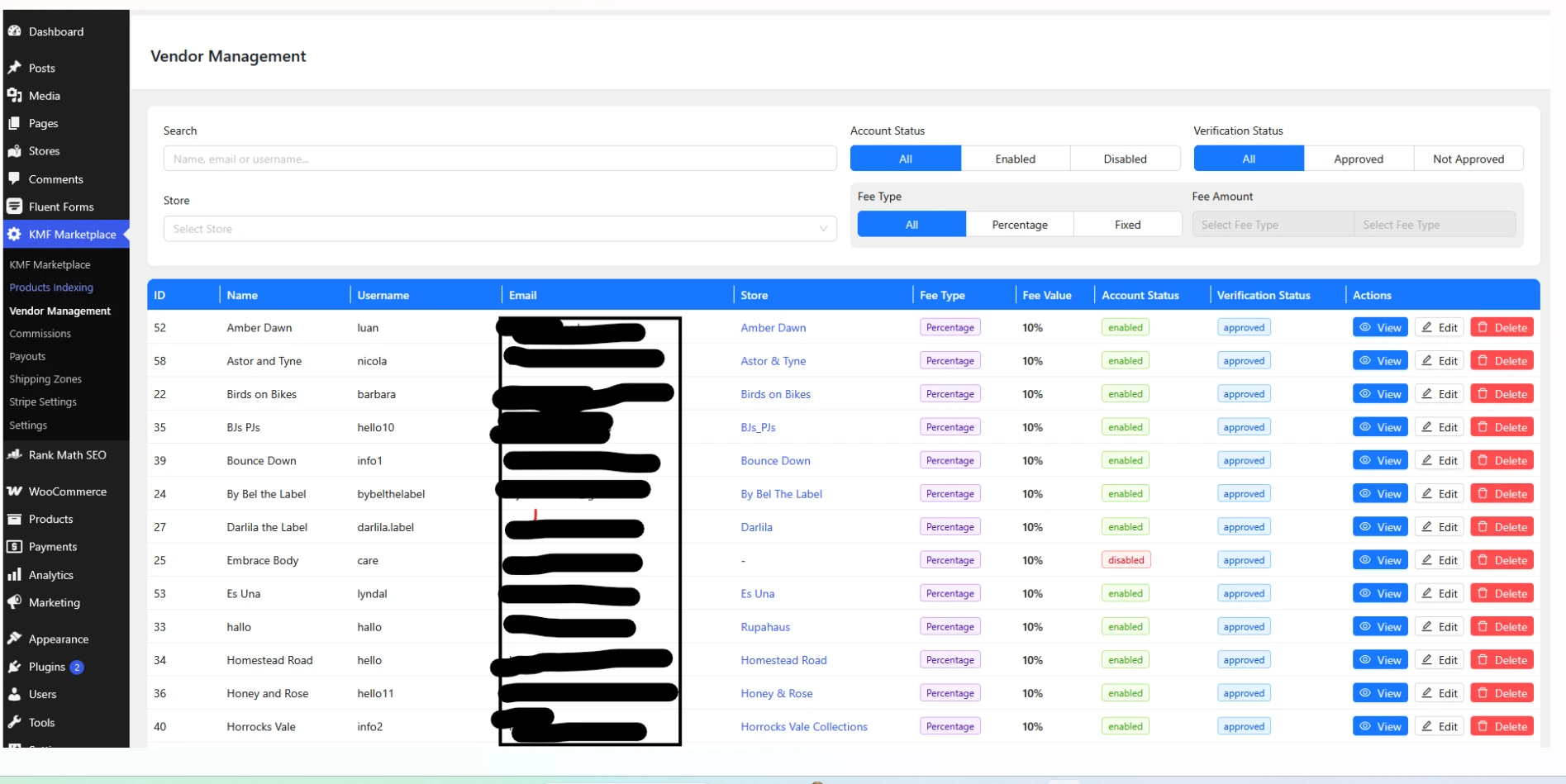
VENDOR MANAGEMENT
Commissions and Payouts Need More Than One Happy Path
Vendor payment architecture should reflect how the marketplace actually operates. Some vendors may connect directly to a payment platform, while others may require manual or externally processed payouts.
PATH A
Stripe Connect
Connected vendor payout workflow for vendors who use Stripe directly.
PATH B
Manual Payout
PayPal or another external payment, with the admin recording or adjusting the payout in the marketplace administration layer.
Not every vendor must use Stripe, and not every payout is fully automated.
Marketplace Checkout Architecture Has to Serve the Business
Payment architecture sometimes changes when real marketplace constraints appear. The correct response is to adapt the system rather than preserve an initial technical assumption that no longer fits.
ORIGINAL APPROACH
Stripe Connect
Encountered marketplace / vendor-payment limitations.
→
FINAL APPROACH
WooCommerce Native Checkout
Supports required marketplace workflows and standard WooCommerce payment methods, including PayPal.
Business requirements > attachment to the original technical plan.
Shipping Is Marketplace Infrastructure
Shipping in a marketplace may depend on destination, vendor, product, region or other operational rules. It should be treated as part of the platform architecture rather than an afterthought attached to checkout. KnowMyFit includes dedicated shipping-zone administration.
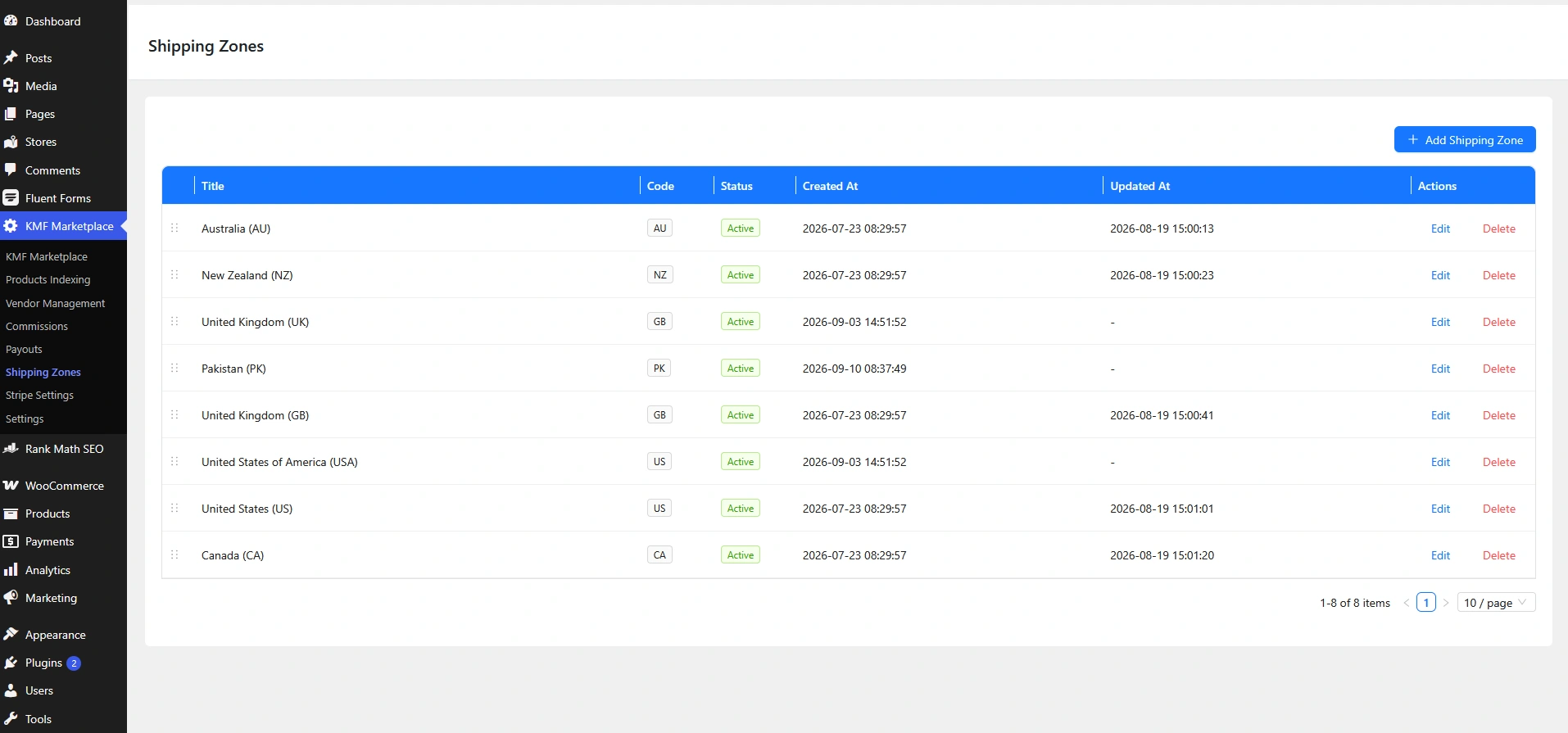
The captured state shows configured zones for Australia, New Zealand, United Kingdom, Pakistan, United States and Canada — a point-in-time configuration record, not a permanent or exhaustive supported-country list.
Marketplace Discovery Can Go Beyond the Product Grid
Some marketplaces need to help customers discover sellers as well as products — location, specialty, availability, fit, category or other marketplace-specific dimensions. These are examples of discovery built around a business model, not a generic feature list every marketplace needs.

MEASUREMENT-BASED PRODUCT DISCOVERY
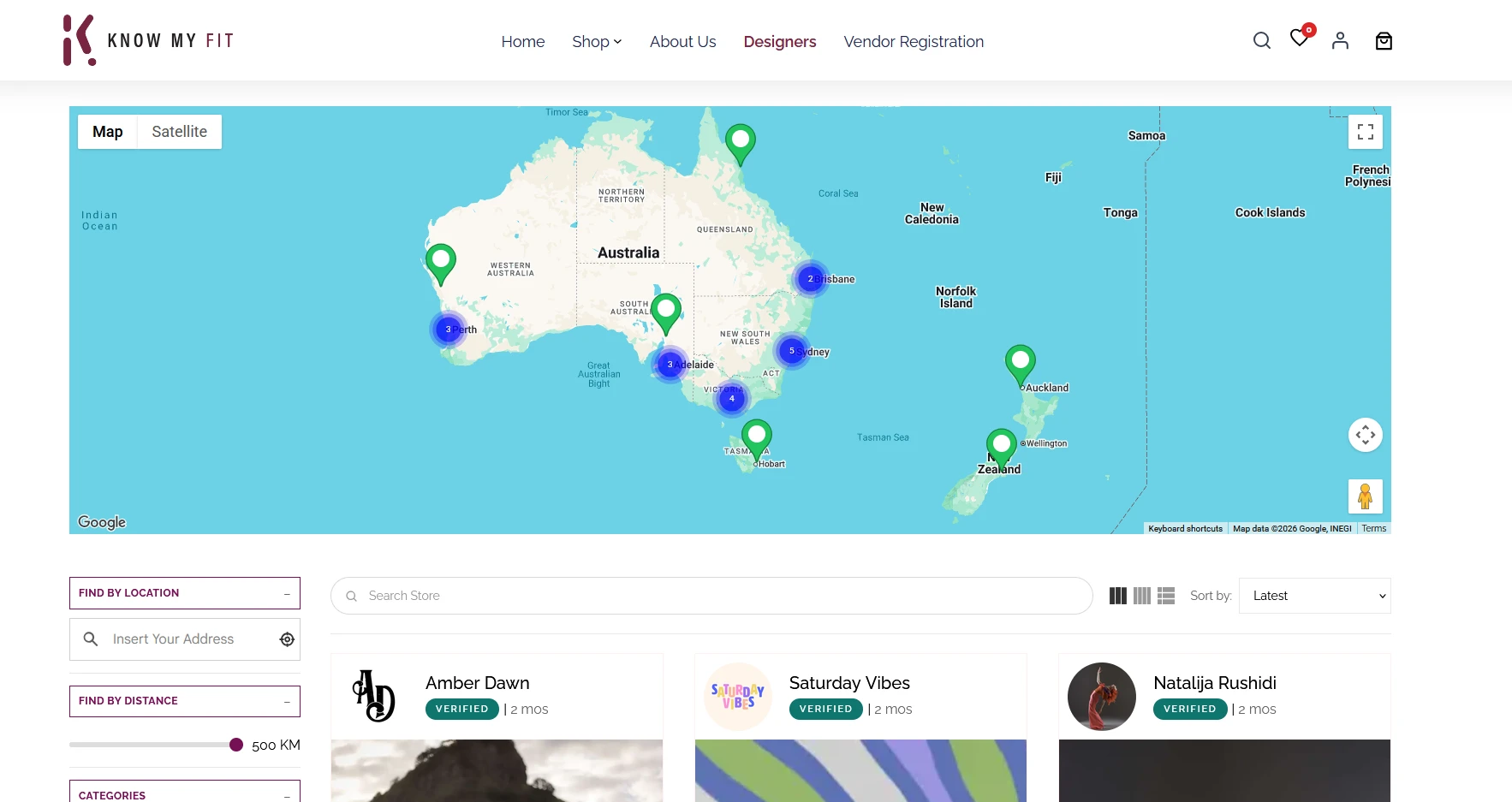
GEOGRAPHIC DESIGNER DISCOVERY
REAL PROJECT · KNOWMYFIT
Rebuilding KnowMyFit as a Custom WooCommerce Marketplace
KnowMyFit is an Australian fashion marketplace built around helping customers find clothing that fits their physical measurements while supporting independent designers. The previous platform had become slow, plugin-heavy and difficult to maintain. SleekAlgo rebuilt the frontend and backend around a custom WooCommerce marketplace framework.
The rebuilt platform includes:
Measurement-based product discovery (chest, waist, hips, inseam)
Dedicated product / variation indexing for marketplace filtering
Custom vendor onboarding and marketplace administration
Vendor verification and fee / commission management
Stripe Connect and manual vendor payout workflows
WooCommerce native checkout with standard payment methods including PayPal
Custom shipping-zone administration
Geographic designer discovery
Custom Marketplace Does Not Mean Rebuilding Commerce From Scratch
The goal is not to discard everything WooCommerce already does well. A good custom marketplace keeps mature commerce capabilities where they make sense and customizes the parts that are slowing the business down or forcing it into the wrong workflow.
LAYER 01
WooCommerce
Products, cart, checkout, orders, payment ecosystem.
LAYER 02
Custom Marketplace Layer
Vendors, commissions, payouts, discovery, indexing, marketplace operations.
LAYER 03
Business-Specific UX
Customer discovery, seller workflows, regional rules.
This balance reduces unnecessary reinvention while giving the marketplace control where it matters.
Our Marketplace Development Process
01
Map the marketplace model
Customers, vendors, products, commissions, payouts, shipping, discovery, operations.
02
Audit the current architecture
Identify plugin bottlenecks, duplicated responsibilities, slow queries, fragile workflows.
03
Define the data architecture
Decide what stays native WooCommerce and what needs custom indexing, tables, APIs.
04
Build customer + vendor experiences
Storefront, discovery, onboarding, accounts, marketplace workflows.
05
Build administration + operations
Practical controls for vendors, fees, payouts, shipping and marketplace data.
06
Test real marketplace scenarios
Customer flows, vendor states, commissions, payouts, shipping, filtering, edge cases.
Not Every Marketplace Needs a Custom Framework
If a proven multi-vendor plugin can handle the marketplace requirements cleanly, reliably and at the required performance level, it may be the right solution. Custom development becomes valuable when the business model, scale, discovery experience, vendor workflows or operational requirements no longer fit the assumptions of the plugin stack.
The simplest reliable marketplace architecture that can support the business.
Multi-Vendor Marketplace FAQ
Yes. WooCommerce can remain the commerce foundation for products, cart, checkout and orders while custom development handles marketplace-specific vendor, commission, payout, discovery and operational logic.
Not necessarily. We first evaluate whether the existing plugin can support the requirements cleanly. A custom marketplace layer is justified when plugin limitations are creating performance, workflow or maintainability problems.
Yes. Commission or fee logic can be designed around the marketplace model, including vendor-specific rules where required.
No. A marketplace can support connected payout workflows as well as manual payout processes when that is required by the business.
Yes, when the bottleneck is data retrieval or query architecture. Depending on the marketplace, dedicated indexing or purpose-built data structures can reduce dependence on expensive runtime product queries.
Yes. Marketplace discovery can be built around business-specific data such as measurements, location, vendor attributes, categories or other structured criteria.
Yes. In many cases WooCommerce can remain the commerce engine while the marketplace-specific plugin layer is replaced or restructured.
Yes. A marketplace project can include vendor onboarding, account management, verification, commissions, payouts, shipping controls and other administrative workflows required by the platform.
Building a Marketplace That Has Outgrown Generic Plugins?
We work remotely with marketplace teams to define vendor onboarding, payment availability, shipping regions and administration. Those rules are agreed for your operating markets before the WooCommerce marketplace layer is built.