WORDPRESS MALWARE REMOVAL & HARDENING
WordPress Malware Removal & Security Hardening
When a WordPress site is compromised, removing the visible symptom is only the first step. Malicious code, hidden users, backdoors, vulnerable access paths or compromised hosting credentials can leave the environment exposed to reinfection.
SleekAlgo investigates the incident, removes known malicious access, restores trusted code and hardens the WordPress and hosting environment around the evidence we can actually verify.
We deliver cleanup and investigation remotely through access authorized by the site owner. Scope, available logs and the recovery approach are agreed before changes, with findings and remaining uncertainties documented for your team.
MALWARE CLEANUP
BACKDOOR REMOVAL
FILE INTEGRITY
ACCESS REVIEW
HARDENING
INCIDENT INVESTIGATION

KOZY KINGDOM · VISIBLE SYMPTOM + INJECTED CODE
Cleaning the Symptom Is Not the Same as Closing the Incident
A site can look clean after the visible payload is removed while the access path or persistence mechanism remains. This is why serious cleanup should examine more than the file that happened to contain the malware.
SYMPTOM CLEANUP
SEEN
Visible symptom
↓
DONE
Remove malicious code
INCIDENT RESPONSE
01
Incident
02
Investigate access
03
Remove persistence
04
Restore integrity
05
Harden
06
Monitor
The goal is not just to make the malware disappear. The goal is to reduce the chance that the same access path remains available.
INVESTIGATION MATRIX
What We Investigate
WORDPRESS → CONFIGURATION & INTEGRITY → HOSTING & EVIDENCE
WORDPRESS LAYER
01
Modified WordPress core, plugin and theme files
02
Hidden or unauthorized administrator accounts
03
Backdoor/login code and suspicious custom functions
04
Unexpected PHP inside uploads or other writable directories
05
Cron jobs and scheduled persistence
CONFIGURATION & INTEGRITY
06
.htaccess, wp-config.php and PHP prepend/append behavior
07
Plugin/theme integrity and official checksums where available
HOSTING & EVIDENCE
08
FTP / SFTP / hosting access accounts and scope
09
SSH and cPanel access evidence where available
10
Legacy/staging installations sharing the hosting account
11
Available access logs and filesystem timelines
Our Cleanup & Hardening Approach
01
Stabilize the live site and preserve useful evidence
04
Restore trusted core/plugin/theme code and verify integrity
07
Harden WordPress and reduce unnecessary attack surface
02
Identify and remove confirmed malicious code
05
Review hosting access, writable surfaces and legacy environments
08
Improve logging/visibility where the environment allows it
03
Audit users, authentication paths and backdoors
06
Rotate/secure relevant credentials and WordPress secrets
09
Retest the live site and document what was confirmed vs. unproven
FLAGSHIP PROOF · REAL RECURRING INCIDENT
Flagship Proof: Kozy Kingdom
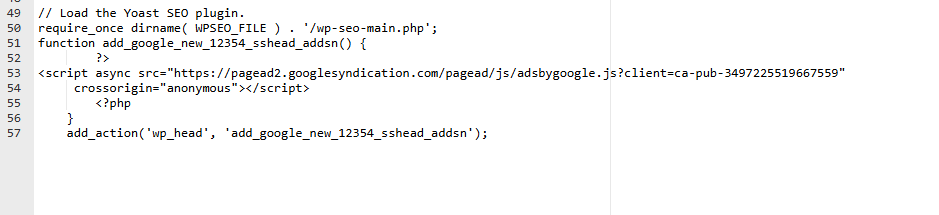
Kozy Kingdom experienced unauthorized advertising injected into its live WooCommerce store. The first incident placed malicious AdSense code inside Yoast SEO. Investigation also uncovered a hidden administrator and malicious child-theme code that concealed the account and enabled unauthorized login behavior.
After cleanup and hardening, the same malicious AdSense publisher ID later returned inside Jetpack. Because two unrelated legitimate plugins had been modified with the same payload, the investigation expanded beyond a single plugin into broader file-write access, hosting accounts, FTP scope, legacy installations, logs and filesystem evidence.
01 · AUGUST
Unauthorized ads appeared
02 · FILE
Malicious code in Yoast SEO
03 · ACCESS
Hidden admin + backdoor found
04 · RESPONSE
Cleanup + hardening
05 · SEPTEMBER
Same payload returns in Jetpack
06 · SCOPE
Hosting, FTP, logs, legacy sites
07 · OUTCOME
Cleaned + migrated to a VPS
The environment was cleaned again, official plugin integrity was restored, access surfaces were secured, the legacy environment was removed, logging was improved, and the site was cleanly migrated to a VPS. No further recurrence has been reported to date.
SANITIZED PUBLIC EVIDENCE
Real Security Work Needs Evidence
Selected evidence from the Kozy Kingdom investigation: injected code inside legitimate plugins, hosting-access findings and logging limitations. The full technical narrative is in the case study.
01 · INCIDENT ONE · CODE INJECTED INTO YOAST SEO

02 · RECURRENCE · SAME PAYLOAD IN JETPACK
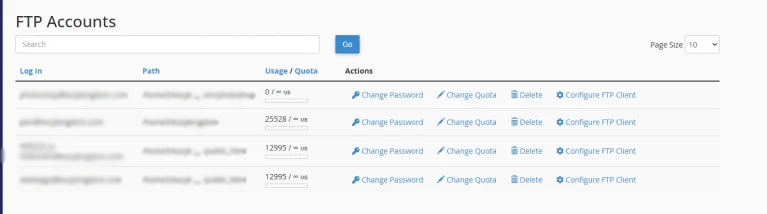
03 · HOSTING ACCESS · FTP ACCOUNTS AND SCOPE
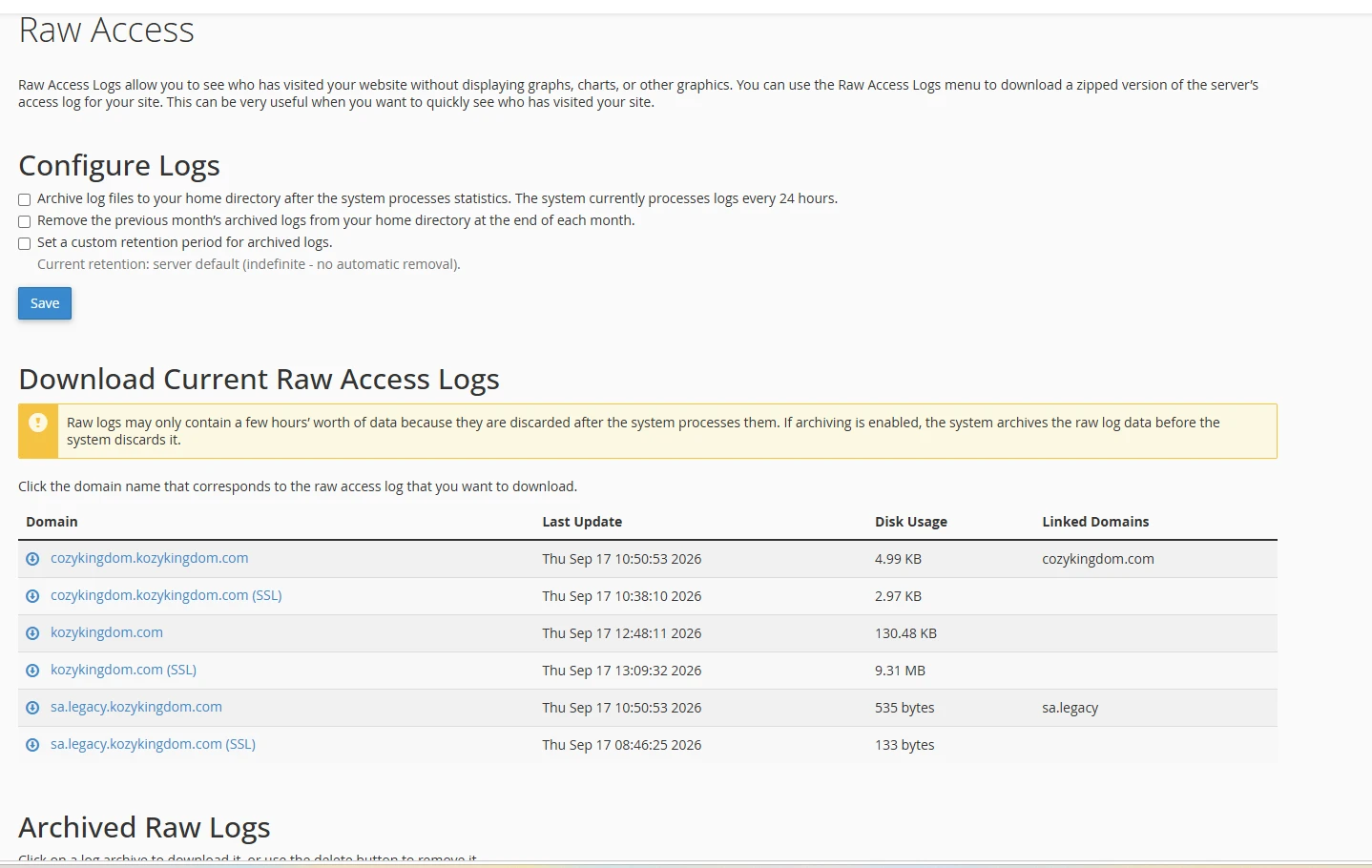
04 · FORENSIC LIMITATION · LOG RETENTION
Modified plugin files were not established as the attack vector. Screens are sanitized; no credentials, private emails or server details are shown.
PERSISTENCE
Backdoors and Hidden Access
Compromise can persist through more than a visibly infected plugin. Unauthorized administrators, custom login shortcuts, modified theme code, stale credentials or broad hosting accounts can preserve access after the obvious malware has been removed.
SleekAlgo reviews the access surfaces relevant to the incident and removes or secures confirmed unauthorized paths.
Hidden administrators
Custom login code
Modified theme files
Stale credentials
Broad hosting accounts
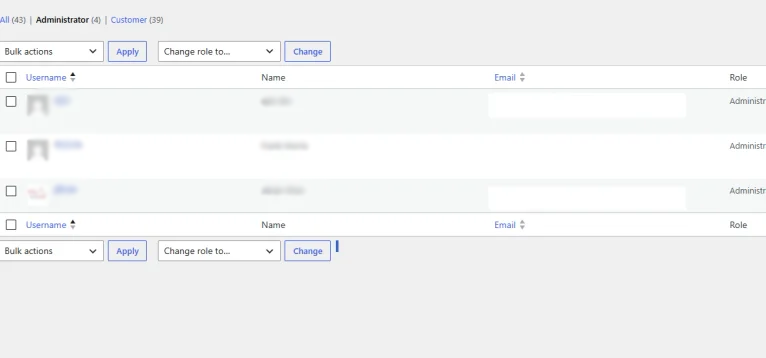
Administrator (4)
→
3 visible
KOZY KINGDOM · SANITIZED

Success: Verified 1 of 1 plugins.
INTEGRITY
Restoring Trusted Code
Where official checksums or trusted package sources are available, restoring and verifying known-good WordPress, plugin and theme code is stronger evidence than simply deleting one suspicious snippet.
PUBLIC CHECKSUMS AVAILABLE
Restore known-good code and verify against the official source
COMMERCIAL / CUSTOM CODE
Commercial/custom code without public checksums requires a different review path and should not be falsely described as checksum-verified.
ACCESS SURFACES
Hosting-Level Access Matters Too
A WordPress compromise may involve access outside wp-admin. FTP accounts, cPanel/File Manager access, sibling sites or legacy installations can all expand the attack surface.
The right response depends on the evidence available. We do not automatically blame the host or a specific account without proof.
ONE SURFACE OF MANY
wp-admin
HOSTING
FTP / SFTP accounts
HOSTING
cPanel / File Manager
SERVER
SSH access
SAME ACCOUNT
Sibling sites
SAME ACCOUNT
Legacy installations
CREDENTIALS
Hosting credentials
INFRASTRUCTURE
When Better Hosting / VPS Migration Makes Sense
A clean VPS migration can be useful when the existing environment lacks sufficient isolation, logging or server-level control, or when legacy hosting clutter makes investigation and hardening difficult.
The benefit is stronger control, separation and forensic visibility—not a promise that a VPS is impossible to compromise.
FROM
Old environment
VERIFY
Verified WordPress / code / data
MOVE
Clean migration
TO
Better-isolated VPS
Stronger isolation
Better logging
Greater server-level control
Cleaner separation from legacy environments
Clean migration means verified WordPress/code/data into a cleaner environment—not blindly copying every old file and legacy directory.
What We Can Help With
WordPress malware cleanup
WooCommerce malware cleanup
Backdoor and unauthorized-admin removal
Plugin/theme/core integrity verification
Security hardening after compromise
Recurring malware / reinfection investigation
Hosting access and FTP/SFTP review
Legacy/staging attack-surface cleanup
Logging and forensic visibility improvements
Clean migration to a better-isolated hosting environment where appropriate
When This Service Is a Good Fit
01
Unauthorized ads, redirects or injected scripts appeared on the site
02
Google or a host/security scanner reports malware
03
Unknown administrators or suspicious user behavior appears
04
Plugin/theme files have been unexpectedly modified
05
The site was cleaned once but the malware returned
06
You need the live store/site restored without blindly wiping business data
07
You need a technical investigation rather than only an automated malware scan
CREDIBILITY
Not Every Security Incident Has a Provable Root Cause
Good incident work separates confirmed evidence from reasonable hypotheses. Sometimes the exact entry path cannot be reconstructed because logs have rotated, credentials were already changed, or the attacker modified existing files without leaving a clear new artifact.
We would rather document what the evidence supports than invent certainty.
Frequently Asked Questions
Yes. The objective is to preserve legitimate site content, orders, customers and business data while removing confirmed malicious code and unauthorized access. The exact approach depends on the compromise.
Recurring malware usually means the investigation needs to expand beyond the visible payload. Potential persistence and access paths may include users, custom code, credentials, hosting accounts, sibling sites, scheduled tasks or other writable surfaces.
Sometimes. It depends on the evidence and log history available. If the relevant logs have already rotated or the attacker modified existing files without leaving enough evidence, the exact entry path may not be provable.
Yes. We review relevant plugin/theme files and can verify official WordPress.org checksums where available. Commercial and custom code requires different integrity checks.
A VPS can provide stronger isolation, logging and server-level control, but it is not a guarantee against compromise. Security still depends on code, credentials, configuration, updates and ongoing operational practices.
Yes. Hardening can include access cleanup, credential rotation, WordPress configuration changes, reducing unnecessary attack surface, better logging and other incident-specific measures.
Dealing With a WordPress Security Problem?
Tell us what you are seeing and what has already been tried. We can help investigate, clean and harden the environment based on the evidence available.